🔗 Read on Medium
 *What is WordPress?*
Quick Summary (TL;DR) This article explains WordPress and CMS concepts in plain language suitable for beginners, along with technical notes for when you need more depth. It covers what a CMS is, the differences between SaaS and self-hosted, WordPress’s basic architecture, headless approaches, multi-site, and content modeling, and includes tables comparing WordPress’s pros and cons.
1. What is a CMS? (And why does it save lives?)
A CMS (Content Management System) is software that allows you to manage web pages, posts, images, users, and menus without needing to dive into technical details.
Let’s use a simple analogy.
Imagine if you had to manually write every blog post for your blog in HTML. This would take hours. If you wanted to use a modern JavaScript framework, you would need to design a whole system from scratch.
The biggest advantage of WordPress is that it offers a ready-to-use suite of powerful features with just a single installation, without the need for coding from scratch. With comprehensive themes and plugins, you can quickly achieve full theme customization, multi-layered user roles and permissions, SEO tools, a media library, a form manager, and even complex functions like e-commerce without writing custom code. While building from scratch with a framework like Next.js provides freedom and full control over every component, it requires significant time, effort, and expertise for each feature. WordPress and other CMSs, especially for content-focused projects, offer speed, cost advantages, and ease of use by reducing this process to near zero.
Basic benefits (simply)
- Create content without knowing code.
- Role-based authorization for multiple authors and roles.
- Easy addition of features like SEO, media management, and forms via plugins.
2. What is WordPress?
WordPress is a content management system (CMS) designed to make creating content and managing a website as easy as possible. Starting in 2003 as a simple blogging engine, WordPress has evolved into an incredibly flexible platform thanks to plugins and themes; today, it is used for everything from blogs and corporate sites to portfolios and full-fledged e-commerce stores.
So, what makes it easy? Even with minimal technical knowledge, you can write posts, create pages, upload images, assign user roles, and set up menus. You can accomplish all of this with a few clicks from the administration panel. If you are a developer, you can write new themes or plugins and perform deep customizations via PHP or REST API when needed. This combination of no-code, user-friendly interface, flexibility, and a massive ecosystem forms the greatest strength of WordPress.
Personal blogs, news sites, corporate pages, educational platforms, membership sites, and e-commerce stores powered by WooCommerce. Because the plugin ecosystem is so large, you can find ready-made solutions for almost any need (SEO, forms, cache, security, multi-language plugins, etc.), but having too many plugins can increase performance and security risks; therefore, being selective is important.
3. The WordPress Ecosystem: Core Components and Community
The WordPress ecosystem is a massive digital universe consisting of dynamic and interconnected components that go far beyond the software itself. Powering more than 43% of all websites on the internet, WordPress owes its success not only to its technical infrastructure but also to its vibrant and continuously growing ecosystem.
🌍 3.1. Core Software and Open Source Philosophy
WordPress is free and open-source software built on PHP and MySQL/MariaDB, licensed under GPLv2. This license grants users the freedom to use the software for any purpose, inspect how it works, modify it, and distribute it. This “four freedoms” is the cornerstone of the ecosystem’s growth and continuous innovation. WordPress’s roots date back to 2003, when Matt Mullenweg and Mike Little forked the b2/cafelog project.
🎨 3.2. Themes: Democratizing Design
Themes can completely change the visual identity and user experience of a WordPress site. Diversity and Accessibility: There are thousands of free and premium themes available. Users can make their sites look completely different with just a few clicks without writing code. Customization: Themes are not just for aesthetics; they can also improve a site’s functionality by modifying PHP, HTML, and CSS files. Marketplace: Themes can be obtained from the official WordPress theme directory, specialized theme marketplaces, or freelance developers.
⚙️ 3.3. Plugins: Infinite Functionality
Plugins are the most critical component that turns WordPress from a blog platform into an application development platform. Wide Scope: There are over 50,000 plugins in the official directory. With these plugins, almost any feature, such as SEO, e-commerce (WooCommerce), security, forms, forums (BuddyPress), and more, can be added to your site. Easy Access: Almost any required feature can be integrated into a site quickly with a plugin, without needing coding knowledge.
👥 3.4. Community: The Heart of the Ecosystem
Perhaps the strongest aspect of WordPress is its massive and volunteer-based community. Global Contribution: Thousands of volunteer developers, designers, translators, documentation writers, and users worldwide work to improve, test, support, and promote the platform. Support Network: There are countless forums, Facebook groups, Reddit communities (e.g., /r/wordpress), and websites like WPBeginner to help find solutions to problems. Events: WordCamp conferences held all over the world and local WordPress meetups strengthen knowledge sharing and community bonds.
🛠️ 3.5. Developer Tools and Services
For professional developers and agencies, the ecosystem offers a series of tools to optimize workflows. Local Development: Tools like Local WP (formerly Local by Flywheel), MAMP, and XAMPP simplify creating local WordPress development environments on your computer without setting up a server. Code Management: Plugins like WPCode allow you to add and manage custom code snippets without directly editing theme files, preventing your code from being overwritten during theme updates. Deployment and Migration: Plugins like Duplicator make it easy to migrate sites between servers.
📦 3.6. Hosting and Hosting Industry
WordPress’s widespread popularity has made it an integral part of the hosting industry. Optimized Solutions: Almost all hosting providers offer “one-click WordPress installation”, optimized server configurations, and specialized managed WordPress hosting packages. WordPress.com: Operated by Automattic, the company founded by WordPress co-founder Matt Mullenweg, this hosting service allows users to build sites without technical burdens (updates, backups, security are handled for you).
💰 3.7. Economy and Business Opportunities
WordPress has created a multi-billion dollar global economy. Diverse Business Models: Developers and entrepreneurs can earn income through a myriad of ways, including selling premium themes and plugins, custom software development, hosting, maintenance services, consultancy, content creation (blogs, video), and more.
The WordPress ecosystem continues to grow thanks to the unique balance it has established between the open-source philosophy, commercial activities, and a strong community spirit. This ecosystem allows a user with limited technical knowledge to build a professional website with a few clicks, while simultaneously providing the flexibility and power that an expert developer needs to bring the most complex projects to life. To understand how WordPress became the backbone of the internet, it is key to see it as a living organism that is constantly evolving.
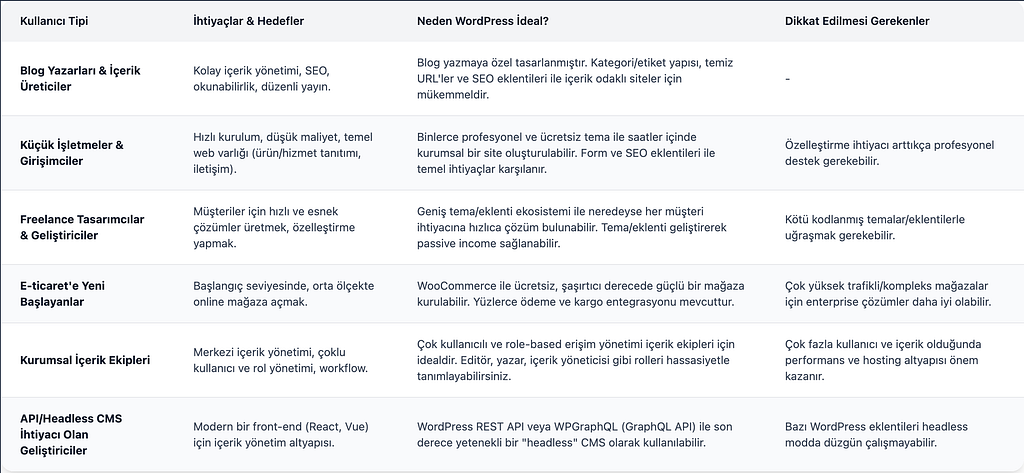
🎯 So, Who is WordPress Exactly Ideal For?
WordPress can be a solution for everyone, but it is particularly unmatched for certain needs and profiles. The following table summarizes why it is ideal for specific user types:
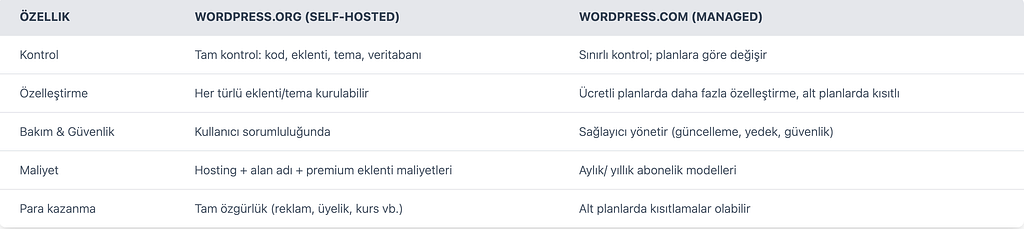
4. SaaS vs Self‑Hosted (Managed Service vs Self-Hosting)
SaaS (Software as a service): This refers to software being offered to you as a service.
When looking at your project, you need to ask yourself: Speed or Control?
- SaaS (Wix, Squarespace, Shopify, WordPress.com): You get fast setup and minimal technical overhead. Hosting, security, and backups are managed by the service. Disadvantage: more limited customization, vendor lock‑in risk, and long-term subscription costs.
- **Self‑Hosted (WordPress.org): **You download the software and run it on your own server. You have the control. You can install any plugin/theme you want, write your own custom code, and run it on your server. Disadvantage: hosting, security, backups, and scaling are your technical responsibilities.
A Brief Guide for Selection:
- If you want to go live quickly and not deal with technicalities, go with SaaS.
- If you want long-term customization, integration, and full control, go with self‑hosted (WordPress.org).
5. A Friendly Look at WordPress (Simple Architecture and Basic Flow)
I’ve kept the headings technical but understandable. This is enough to understand the core concepts.
5.1 Core Components
- PHP: The server-side language WordPress runs on.
- Database: MySQL or MariaDB. Content is stored in tables like
wp_posts, meta data inwp_postmeta, etc. - Web server: Nginx or Apache.
- File system:
wp-content/themes,wp-content/plugins,uploads.
5.2 Simple Request Flow
- Browser request → Web server (Nginx/Apache).
- PHP runs (
index.phpis initialized),wp-config.phpis read. - Core, themes, and active plugins are loaded.
- Content is fetched from the database (WP_Query).
- The theme (template) receives the data, generates HTML, and returns the response.
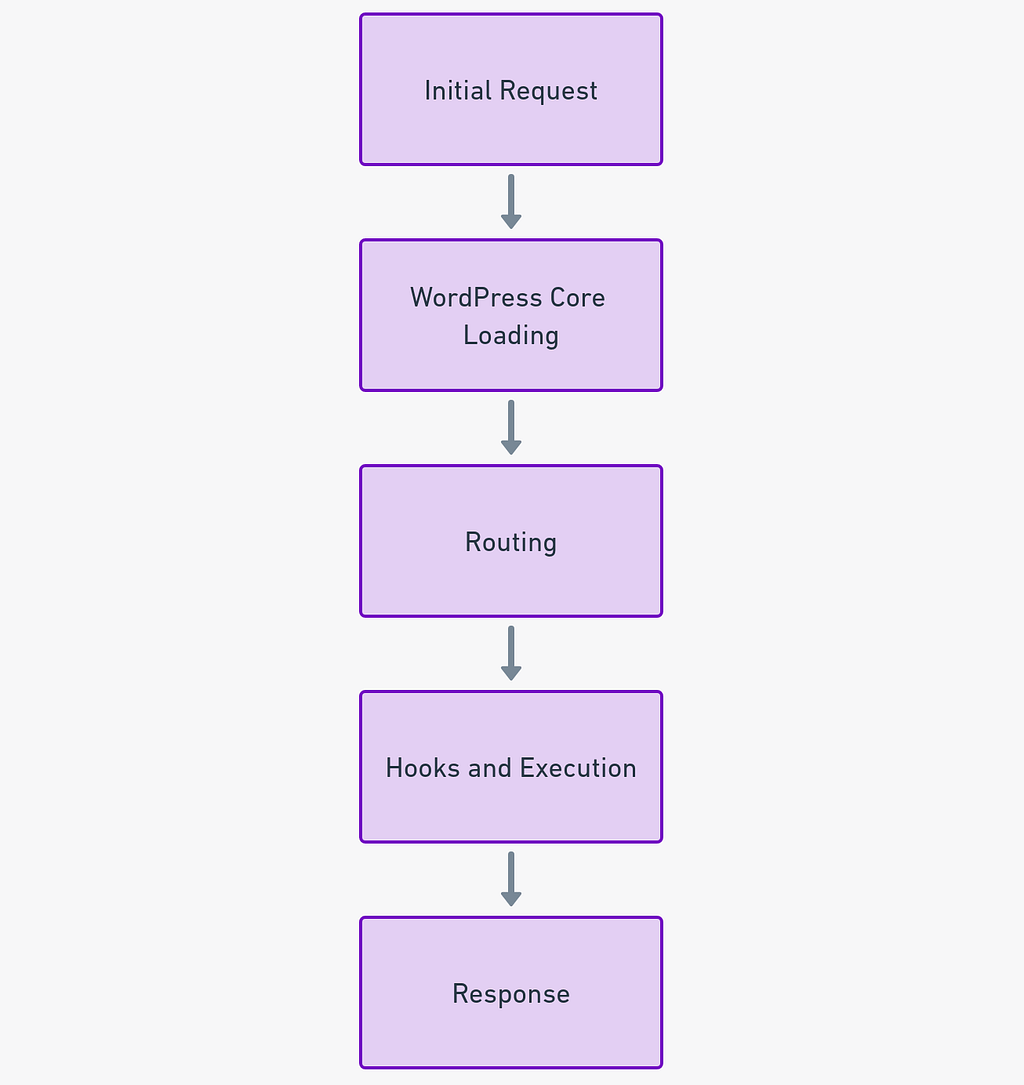 *WordPress Request Loop*
### 6. Headless WordPress: When to Prefer It?
*WordPress Request Loop*
### 6. Headless WordPress: When to Prefer It?Headless systems are like separating the kitchen (backend) of a restaurant from the dining room (frontend) where food is served. The kitchen prepares the food (processes and stores data) and prepares it to be served to waiters (web sites or mobile apps). The waiter then takes this food (the data) and serves it to the customer in the most stylish, personalized, and customized way (with a completely unique design). This way, while the kitchen’s efficiency increases, the waiter can also provide a much better and more personalized experience to the customer.
Headless WordPress is the approach where you use WordPress only for content management and build the frontend with a different technology (React/Next.js, Vue/Nuxt, etc.). Content is served via REST API or GraphQL.
Advantages:
- Full frontend control (modern JS ecosystem).
- High performance and SEO advantages with SSR/SSG.
- The same content can be used on different platforms (web, mobile, IoT).
Disadvantages:
- Implementation of frontend and content management is more complex (preview, WYSIWYG experience).
- Some WordPress plugins may not work with headless.
7. Multisite, Multilingual, and Content Modeling
Multisite: The WordPress Multisite network allows you to create and manage multiple independent websites (with a single WordPress installation (and a single database) through a central management (plugin and theme updates, user management, etc.). However, there is a risk of centralization: an error in the main installation (e.g., a faulty plugin update) or a security vulnerability can affect all sites on the network at once. Therefore, a strong server infrastructure, strict backup policies, and testing in a staging environment are essential.
Multilingual: There are two main ways to build a multilingual site in WordPress: using plugins like Polylang or WPML, or adopting a headless approach. Plugins like Polylang and WPML work within the traditional WordPress structure and allow you to create different language versions of each content item with a user-friendly interface. However, in a headless approach, content is consumed via API, so content modeling needs to be locale-based from the start. For example, designing custom fields for each language and ensuring the API serves the correct content based on the language parameter (e.g., ?lang=tr or the locale field in GraphQL) is crucial. This requires more upfront planning and technical infrastructure than traditional plugins.
Content Modeling: Custom Post Types (CPT) and Custom Fields are what transform WordPress from just a blog platform into a powerful Content Management System (CMS). For example, you can create a “Movie” post type and add custom fields like “Director”, “Release Year”, “IMDB Rating”, etc. The Advanced Custom Fields (ACF) plugin provides a visual and easy-to-use interface to create these fields. For large-scale projects, to prevent performance issues, content is often indexed in an external search and indexing engine like Elasticsearch or Algolia before being served via API. In headless WordPress, this is even more critical; ensuring the API serves fast and optimized queries requires external indexing.
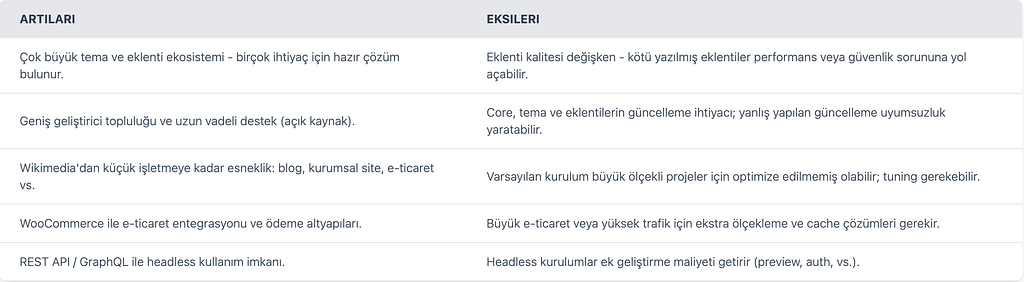
8. WordPress: Pros and Cons — Comparative Table
WordPress (General) — Pros / Cons
WordPress.org vs WordPress.com — Comparison
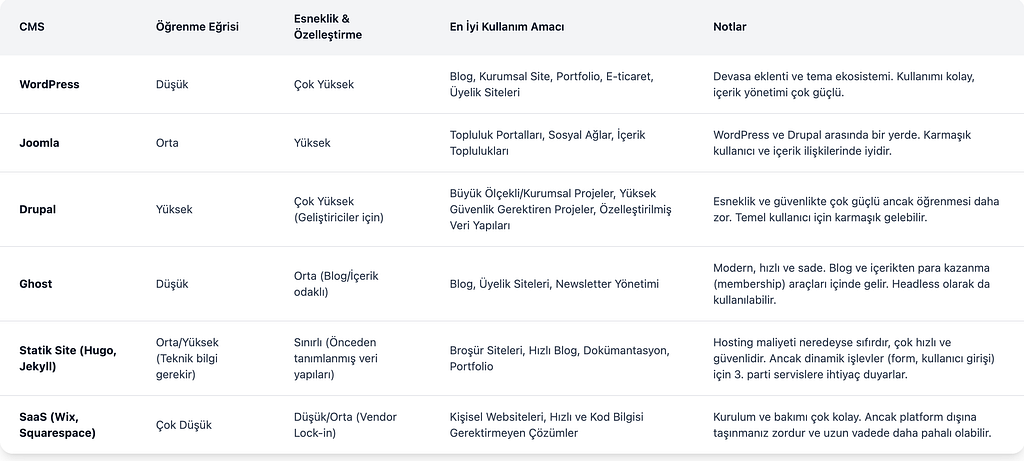
🔄 CMS Comparison Table
Although WordPress is the most popular CMS, it is not the only option. It is important to choose the right tool for your needs. Here is a simple comparison with popular alternatives:
9. Resources and Further Reading
- WordPress (official): https://wordpress.org/
- WordPress.com: https://wordpress.com/
- WP-CLI: https://wp-cli.org/
- WPGraphQL: https://www.wpgraphql.com/